
Dexcom Clarity diabetes management software
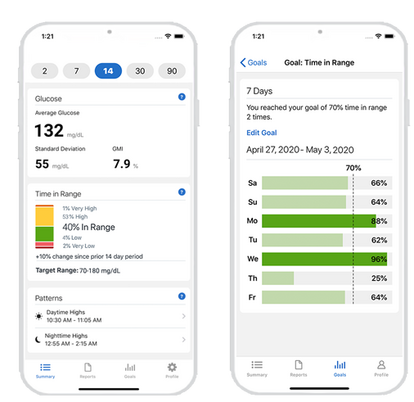
Dexcom Clarity diabetes management software for your compatible smartphone* or computer is an important part of your diabetes management. Log in with your existing Dexcom account to identify glucose patterns and, with your healthcare professional, find ways to improve your management.
You can connect your Clarity data with your clinic for review anytime, even remotely. Using the Dexcom Clarity app, enter the code you get from your clinic.
Just tap Profile > Authorize Sharing and follow the instructions.
If you only use the Dexcom receiver with your CGM, or would like more sharing help, see the patient sharing instructions.
Access key measurements with Dexcom Clarity

TRACK YOUR NUMBERS

VIEW YOUR PATTERNS

GET NOTIFICATIONS

SET GOALS
Diabetes management software
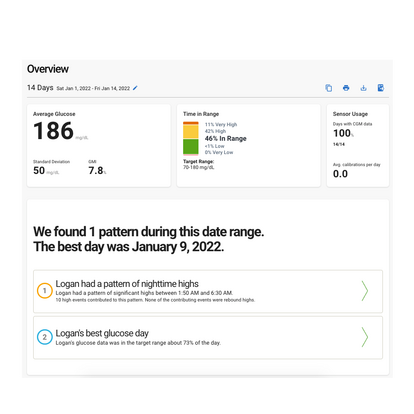
Managing diabetes can be complicated. Simplify how you manage your diabetes using Dexcom Clarity data reporting. Quick access to a variety of reports can help you better assess and understand your health insights.
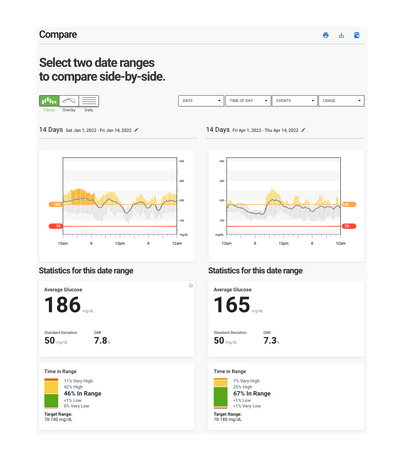
Comparing glucose data, made simple
With Dexcom Clarity's compare feature, you can evaluate your glucose improvement over time. Identify problem areas with the comprehensive data tool and evaluate if your diabetes management solutions are working.
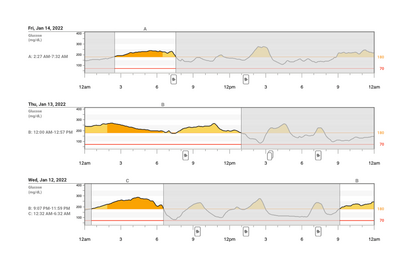
Easily track your patterns
Dexcom Clarity's Patterns report shows your patterns of highs and lows at a glance.
The Patterns report gives context to the frequency, duration, and intensity of hypo- and hyperglycemia patterns. This helps you prioritize your diabetes management.
Dexcom Clarity FAQ
Looking for more information about Dexcom Clarity? Browse through our frequently asked questions (FAQ) to find answers.
The web-based Dexcom Clarity software is intended for use by both home users and healthcare professionals to assist people with diabetes and their healthcare professionals in the review, analysis, and evaluation of CGM data to support effective diabetes management. WARNING Treatment decisions, like treating for a low or dosing for a high, should not be made based on this software. Home users should follow instructions on the CGM system. WARNING The software is not intended to replace self-monitoring practices as advised by a healthcare professional. CAUTION Dexcom Clarity provides recently available CGM information from the Dexcom CGM app or receiver. Since the smartphone system sends data to the Dexcom server, the information is always older than the real-time data displayed on the user’s CGM app or receiver. Use the current information on the CGM app or receiver for treatment decisions, not the information from Dexcom Clarity as that information is outdated. CAUTION The software does not provide any medical advice and should not be used for that purpose. Home users must consult a healthcare professional before making any medical interpretation and therapy adjustments from the information in the software. CAUTION Healthcare professionals should use information in the software in conjunction with other clinical information available to them. CAUTION Federal (US) law restricts this device to sale by or on the order of a licensed healthcare professional