Dexcom G7 Sensor Product Alert
Medsafe Reference: 36809
What is the problem?
New Zealand Medical and Scientific, a Dexcom company, is issuing a Product Alert for two lots of Dexcom US G7 sensors. These lots were identified for disposal and destruction in the USA due to incomplete sterilisation and deployment failure during testing. The devices from both lots were stolen during the disposal process and sold to third parties via unauthorised supply channels.
Product Name | Product Code (REF) | Lot Numbers |
Dexcom G7 sensors | STP-AT-012 | 1725204004 1725069002 |
To date, there is no evidence that these unauthorised sensors are in the New Zealand market.
This problem only affects the lot numbers listed above; no other lots are impacted.
This problem only affects the lot numbers listed above; no other lots are impacted.
What are the risks?
Risks associated with use of the affected sensors include:
- Skin infections
- Inaccurate or loss of readings
- Missed detection of hypoglycaemia (low blood glucose) or hyperglycaemia (high blood glucose), which could lead to serious health consequences.
What should I do?
There is no evidence that these unauthorised sensors are in New Zealand. To confirm your sensor is not affected, you can:
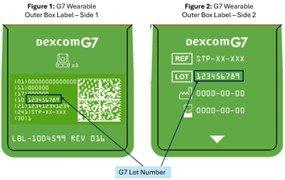
- Check the lot number on your G7 sensor box. If your lot number is not listed in the table above, it is not affected.
- Alternatively, you can search your sensor serial number at dexcom.com/theft-check
If you have an affected sensor:
- Immediately discontinue use and dispose of affected products.
- Replace the affected sensor with an unaffected sensor or use a blood glucose meter for glucose monitoring.
- Contact Dexcom Technical Support to request a replacement.
- If you have symptoms of infection or inflammation, redness, swelling, or pain, at the insertion site, contact a healthcare provider.
Further information
Please contact Dexcom Technical Support on 0508 634 103 for further information.
How do I find my Dexcom G7 lot number?
How do I find my Dexcom G7 serial number?
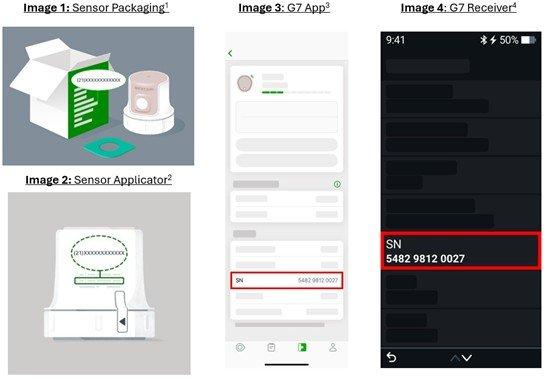
Your Dexcom G7 Continuous Glucose Monitoring System (Dexcom G7) serial number is a 12-digit number used to identify your sensor. You can find it in several places:
- On the sensor packaging1: Check the side of the sensor box. The serial number appears after the label (21).
- On the sensor applicator2: Turn the applicator over to find the back. The serial number appears after the label (21).
- In the Dexcom G7 app3: Open the app and go to Connections > Sensor to find the serial number, labelled SN. If your sensor is not currently connected, the serial number may not appear. However, if you use an insulin pump, your Dexcom G7 serial number might still be visible in the pump’s app.
- In the Dexcom G7 receiver4: From the home screen, select Menu, then go to Information > Sensor > Session info. The serial number appears near the bottom of the screen, labelled SN.