What is a sensor code and why do I need one?
A sensor code allows you to use the Dexcom G6 CGM System without the need for fingersticks or calibrations.* When you start a new sensor, you must enter a code into your display device to pair your display device to your sensor. Each sensor has its own code printed on the back of the adhesive patch.
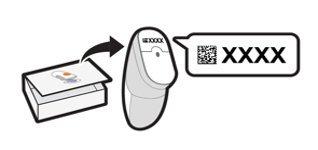
To use your Dexcom G6 CGM without the need for fingerstick* calibration(s), you must enter the 4-digit sensor code into your display device. Please make sure to follow each onscreen prompt, step by step, when starting a new sensor. Each sensor has its own code printed on the back of the adhesive patch. Do not use a code from a different sensor or make up a code. If you have lost the sensor code, you may calibrate Dexcom G6 using fingersticks*.
*If your glucose alerts and readings from the Dexcom G6 do not match symptoms or expectations, use a blood glucose meter to make diabetes treatment decisions.
Dexcom G6 - How to Replace Your Sensor
MAT-7146