How do I create an account using my email address?

If you create an account with your email address, that becomes your Dexcom user ID. You’ll use it to log in to all Dexcom apps and services.
Instructions
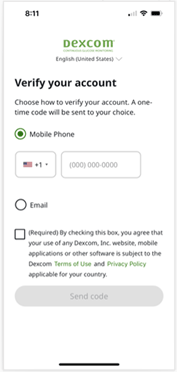
To verify your account using email: 
  1. Open the Dexcom app or go to the website’s login page
  2. Select Email. 
  3. Enter your email address. 
  4. If you accept the Terms of Use and Privacy Policy, check the box.
  5. Select Send code. We’ll email you a code to verify your identity. This safety measure helps protect your personal information.
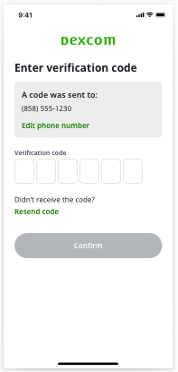
When you get the code: 
  1. Enter the numbers. 
  2. Select Confirm. 
  3. Follow onscreen instructions to continue setting up your account. 

MAT-12723


Dexcom Care is here to help.

LBL-1001709 Rev001

MAT-12723

© 2026 Dexcom Canada, Co. All rights reserved. This product is covered by US Patent.

CA flag

CA